Provenance
How to Use Provenance Search
L5 Provenance is the largest free provenance search in the world. It takes a photo of your coin and finds where that exact coin has sold before, by comparing it against more than 17 million images we have gathered from auction catalogs printed before 2010. Anyone can search, free of charge and without an account; a free L5 account shows you the sale a match came from. Our archive covers the older sales, so if your coin last changed hands after 2010, there are other services that will serve you better than we can.
- 1
Start with a clean, well-lit photo
Open Provenance search and drop in a picture, click to choose one, or paste it from the clipboard. A photo that shows both sides, obverse and reverse, is split for you; a photo of one side opens two slots so you can add the other. A plain, uncluttered background gives the best results. If your photo has clutter behind the coin, use Remove background on each side and we will cut the coin out for you. That also centers each side in the frame, which helps the search line your coin up against the catalog images.
- 2
Confirm the split
When your photo shows both sides, we split it into a separate obverse image and reverse image. Take a quick look at the gold line before you search. If it landed in the wrong spot, drag it into place, or switch to uploading the sides separately.
- 3
Pick your search depth and date range
For almost every coin, leave the depth at Balanced. If a coin is hard to trace and Balanced does not turn it up, raise it to Deep or Maximum so the search casts a wider net. The catalog date range slider narrows the search to catalogs printed between two years when you already know roughly when your coin last sold. There is more on both settings further down this page.
- 4
Run the search
We compare both sides of your coin against every catalog image we hold and bring back the closest matches, with the best ones at the top. This takes a few seconds at the lighter settings and up to a minute or so at the deepest.
- 5
Look through the results for your coin
This is the part that matters most, so please read How the search works below before you judge your results. You are hunting for the one coin in the list that is genuinely yours, the same coin photographed in an earlier sale. It will not always be at the very top, and it will be sitting among other coins that look a lot like it. Results come as obverse-and-reverse pairs; if you are not seeing it, Show Obverse Only and Show Reverse Only list the candidates for each side by itself. Click any result to open it side by side with your coin at full size, then step through the rest with the arrow keys or a swipe.
- 6
Confirm your find
When you spot your coin, click This is my coin — confirm match. That reveals the catalog, the sale and the year, and saves the provenance to your record. We ask two quick questions: whether you already knew about this provenance, and whether we may show the find on the Discovery Wall. Sharing is selected to start with; choose Keep private and nothing is published. If the result is the same type, or struck from the same dies, but not your coin, use Not my coin — similar or die match instead: it is recorded in your searches, not your discoveries, and it helps the tool tell exact matches from look-alikes.
- 7
Share it, or keep it
After a confirmed match you can copy a permanent link, post it to X, Reddit or Facebook, and download a share card or a certificate PDF. Sharing publishes the find to the Discovery Wall, where public finds show the two coins, the catalog and your username, and confirmed finds count on the wall's Top Discoverers board. The card and the certificate are yours either way: downloading them never publishes anything. A find kept private shows its share buttons greyed out, and tapping one asks before making it public.
- 8
Come back to it in your report
My Report keeps every search and every discovery: how many provenances you have found, the oldest sale you have traced, your pre-1970 finds, and a bar for each decade your coins surfaced in. Filter by new-to-the-record, public or private, by catalog date, or by text; sort by newest, oldest sale or auction house. From any record you can redo the search, combine it with a fresh one, flip it public or private, download the certificate, or attach it to a coin you are selling.
- 9
Selling the coin? Verify its provenance on the listing
If the coin is in your L5 store, start from the listing instead: the Verify panel under the photos runs the search with the listing's own photos, and confirming a match attaches the record to the listing as verified provenance — a green tag buyers can filter by, with the catalog plate shown to them if you tick that box. You can also attach an existing discovery from your report with Add to a listing. Verified listings count towards your store's Provenance keeper badge.
How the search works, and why you will see coins that are not yours
A lot of people run their first search, see a page of coins that are not theirs, and assume the whole thing is broken. Sometimes the results even include coins that look nothing like what they searched, like a medieval penny sitting in the results for a Roman denarius. It is worth understanding what the tool is doing, because that is almost always a sign it is working the way it should.
When you run a search, we turn each side of your coin into a kind of visual fingerprint and compare it against the fingerprint of every coin in the archive, millions of them. We then rank the whole archive by how closely each image resembles yours, and we show you the top of that ranking.
Here is the important thing to understand. The tool does not know what a Roman coin is, or a Greek one, or a medieval one. It has no idea about rulers, mints, or denominations. All it does is look at images and judge how similar they appear. So the ranking is driven by raw visual likeness: the shape of the flan, the surface and toning, the wear, the lighting, the way the coin was photographed or cast. Every so often a coin from a completely different world will happen to score high on that likeness and land in your results. That is not the search failing. It just means one image looked similar to the tool, even though you can see at a glance that it is the wrong coin.
What the tool is really after is one specific thing: the single image in the whole archive that is your exact coin, photographed in an older catalog, often decades ago and under different light. It is not sorting the archive into types for you, and a die match is not a provenance. Finding your coin among the results is the last step, and that step is yours.
So read down the list and look for that one coin. The real match might be first, or it might be seventh, or fortieth, sitting in a crowd that includes both close look-alikes and the odd coin that has nothing to do with yours. Pass over the ones that are obviously wrong and compare the small things that only your coin has: the exact outline of the flan, how the strike is centered, a particular scratch, a die crack, a patch of toning, a letter that sits off the edge. When those details line up, you have found your coin, and with it the provenance you were after.
If you read all the way down and none of them is truly your coin, that is a real answer too. Your coin may simply not appear in any catalog we hold yet, or it last sold after 2010, which is outside our archive. Before you give up, raise the search depth and try again, and check each side on its own with the obverse-only and reverse-only lists.
Removing the background
A busy background pulls the search off course, so the cleaner the photo, the better the result. If your coin is sitting on a tray, a hand, or any cluttered surface, choose Remove background for each side. We cut the coin out and place it on a clean, even field.
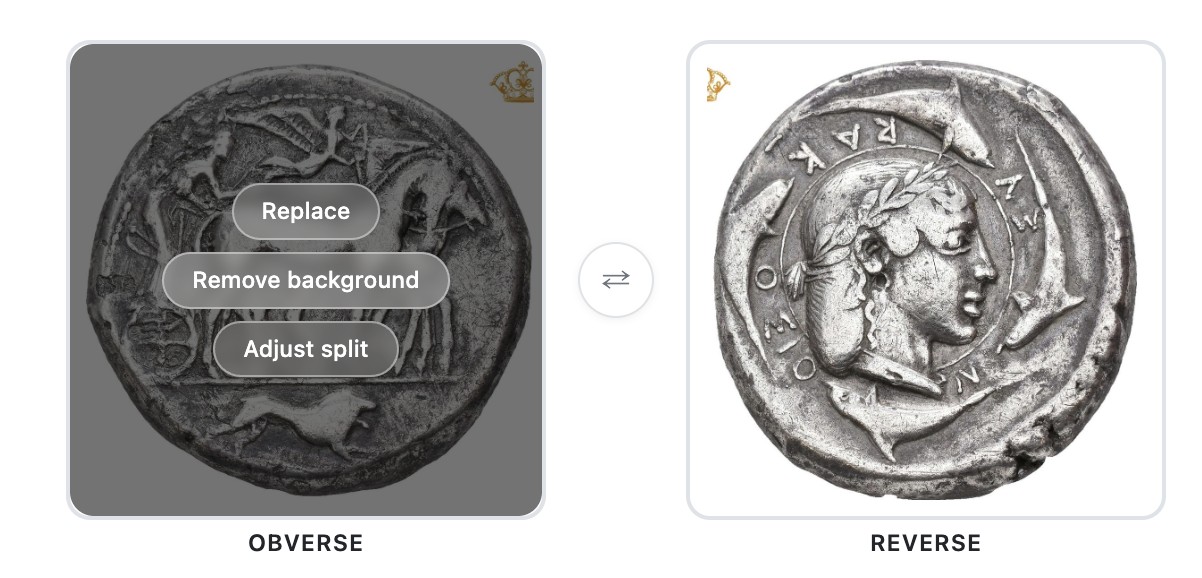
Removing the background does one more thing that really helps: it centers each side in the frame. A centered, background-free coin is what the search lines up best against the old catalog images, so this one step often does more for your matches than anything else you can do.
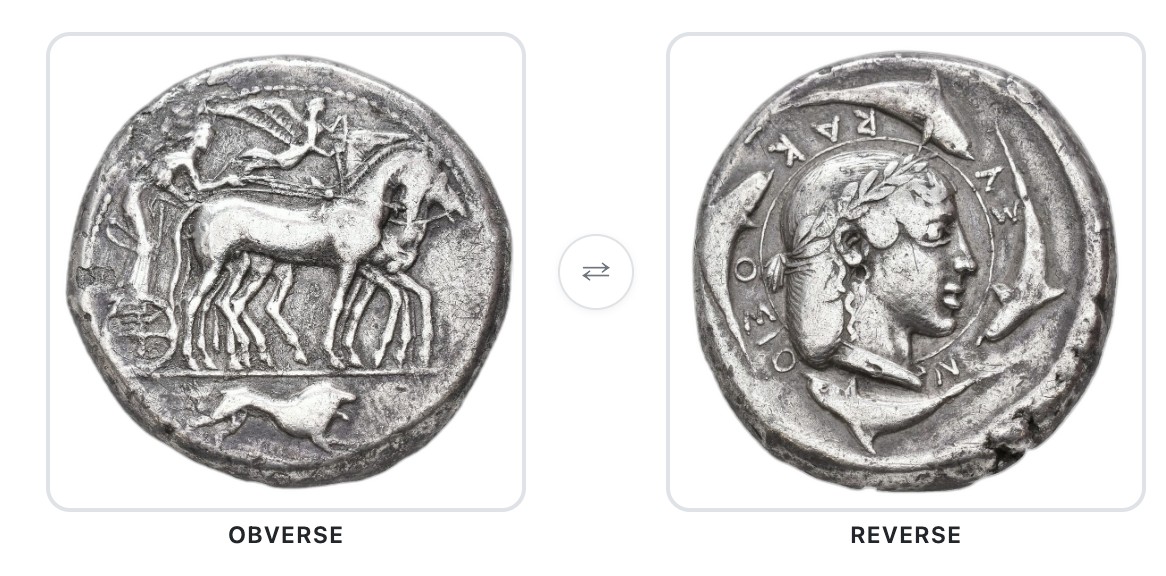
Getting a clean split
When your photo shows both sides of the coin, we split it down the middle into an obverse and a reverse. Most of the time we get it right, but it is worth a quick look before you search. If the line landed in the wrong place, drag the handle to set exactly where the obverse ends and the reverse begins.
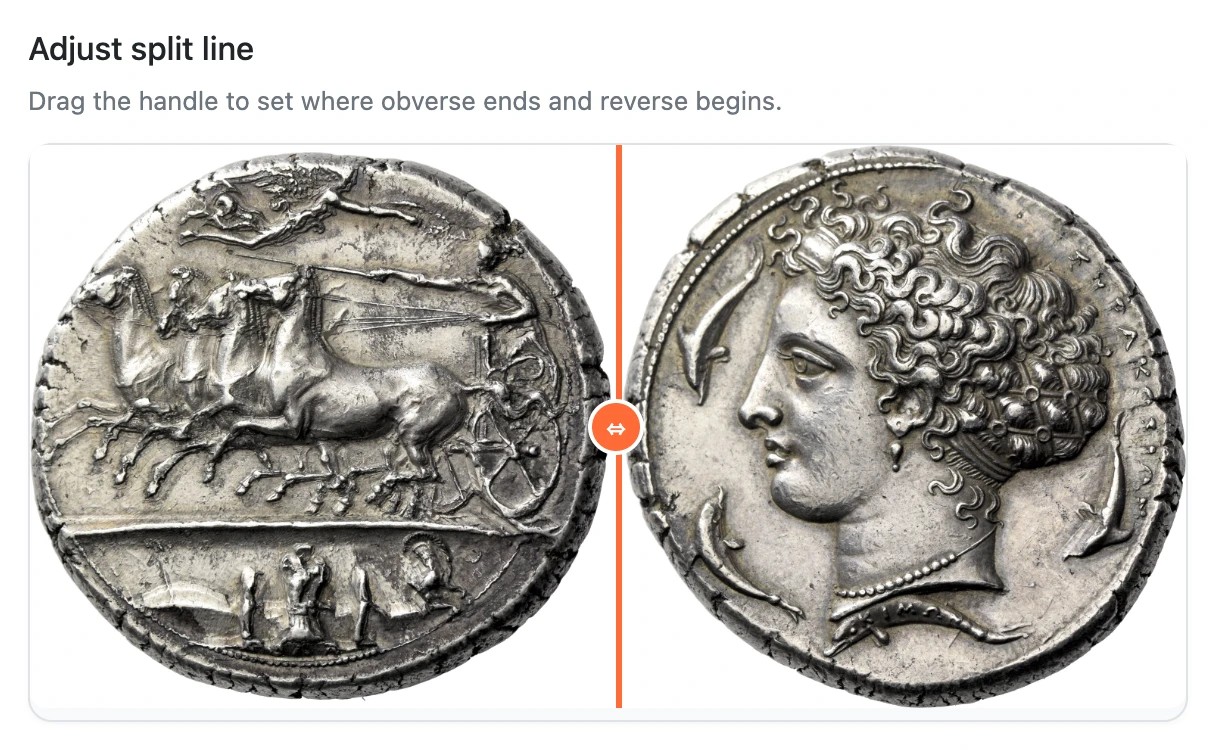
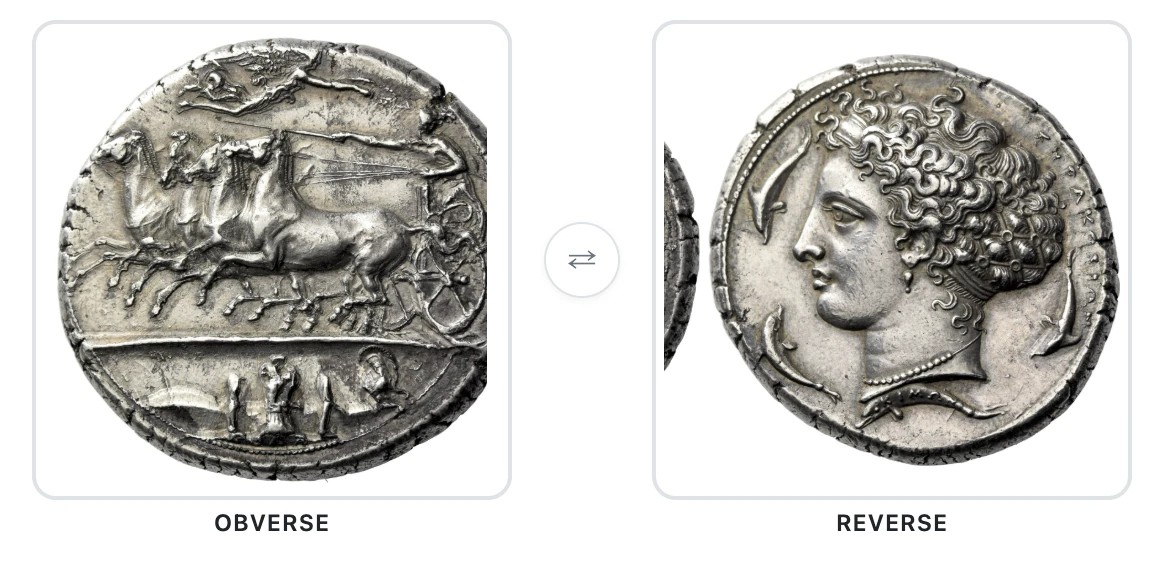
Watch out for a stray neighbor. If another coin sits close to yours in the photo, the crop can catch a sliver of it, like the dark edge on the left of the reverse below. This matters far more than it looks. A bad split is one of the fastest ways to wreck a search. When a panel holds part of the wrong coin, or cuts off part of yours, the tool is matching against the wrong picture, and a coin that is sitting right there in our archive can sink far down the results or never show up at all. So take the extra second and drag the handle until each panel holds one clean side of your coin and nothing else — or upload the two sides as separate photos.
Choosing your search depth and date range
Search depth sets how much of the archive we weigh before ranking your matches. More depth is not always better, so here is how to choose. The slider runs from shallow to deep, and the label under it says how much noise to expect.
- Quick and Fast. The fastest settings. When your coin is clear and distinctive, they are just as accurate as the slower ones, and they make a good first try.
- Balanced. The default, and the best all-round choice. Start here.
- Deep and Maximum. These search wider and reach coins the lighter settings can miss. They take longer, and because they pull in more look-alikes, your true match can sit a little lower in the list. Use them when Balanced does not find your coin.
- Insane. The whole archive, for a coin you are sure is in there somewhere. Very slow and very noisy; keep it for a coin the other settings have already failed on.
The catalog date range has a handle at each end, from 1880 to 2010. Pull them in when you know roughly when the coin last sold — a coin from a 1930s collection has no business being compared against 2005 catalogs — and the search gets both faster and cleaner. The same slider on your report page filters your finds the same way.
A note on old catalogs and cast coins
Many catalogs printed before about 1960 did not photograph the coins themselves. They photographed plaster casts of the coins. A good cast copies the surface of a coin very faithfully, so the design, the wear, and small marks all come through, and those still match well. The one thing a cast does not reproduce exactly is the edge and rim, which can look different from the struck coin. If you are comparing your coin to a very old catalog image and the edge looks a little off, that is usually why. Trust the surface detail over the edge.
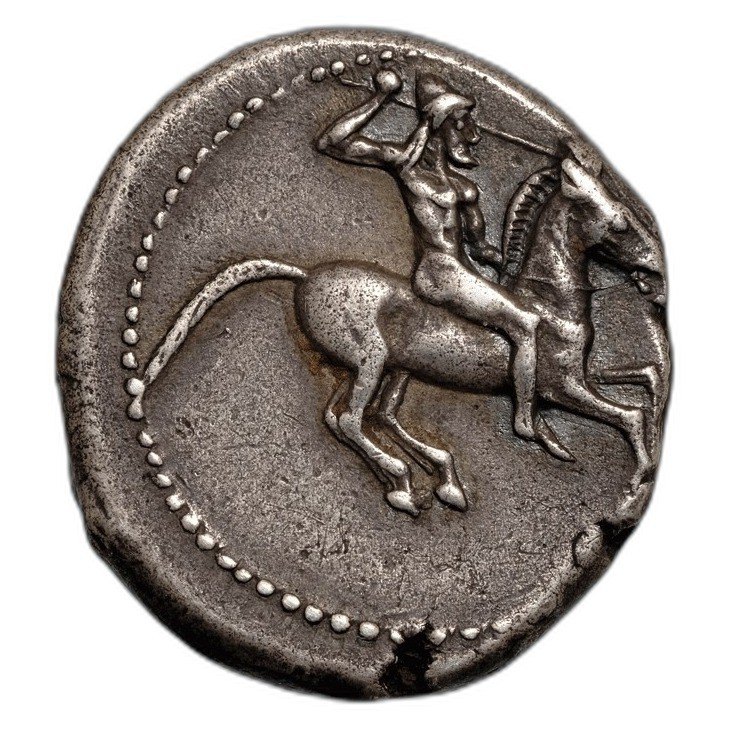
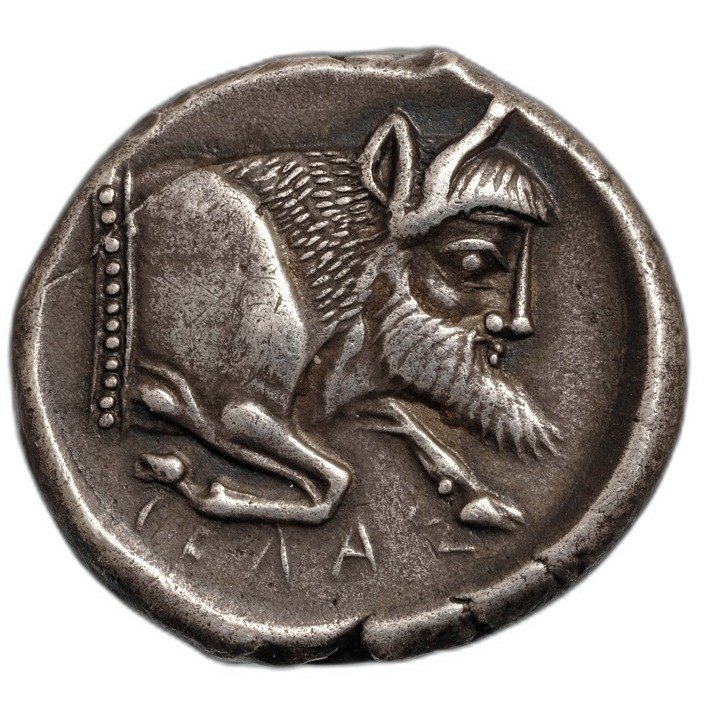
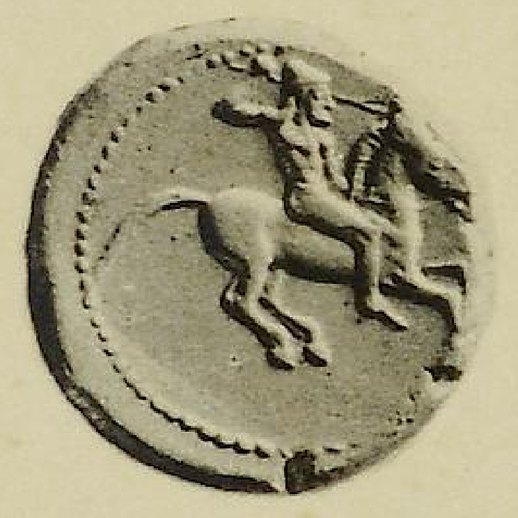
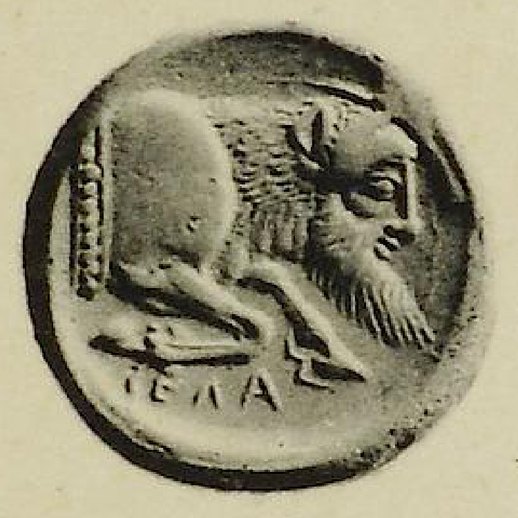
The 1912 image is very obviously a plaster cast, with its flat, chalky surface and soft rounded rim. Even so, the same design and the same small details carry across both sides, which is exactly why it still matches your coin.
The Discovery Wall, and your privacy
The Discovery Wall is the community's gallery of coins traced back to the sale room they came from. Every find there shows the two coins side by side, the catalog and sale, and the name of the person who found it, with the top discoverers listed below the wall. Each public find also has its own permanent link, which is what the share buttons hand out.
Nothing goes on the wall unless you say so. A find is private by default; you choose when you confirm the match, and you can change your mind either way from your report at any time. Downloading the card or the certificate never publishes a find. Occasionally L5 makes a discovery private and locks it, for example at the request of a coin's owner; the record then shows Private · locked and cannot be shared.
The sale-room plate is copyright of the house that printed it. Public finds show it; a find attached to one of your listings shows it to buyers only if you tick the box when you confirm.
Help grow the archive
Our coverage of pre-2010 catalogs is deep, and it keeps growing. If you have scans of older auction catalogs that we might be missing, send them our way. Every catalog someone contributes makes the search sharper for everyone who uses it.